In short
- A butcher's order doesn't fit a shopping cart. Weights change at the block, so the price isn't known until it's cut. An order form that works like the counter suits it better.
- Every order gets a number, whether it came from the website or the phone. The number is on the thank-you screen, every email, the board and the printed sheet.
- Website orders and phone orders sit on one board, so nothing lives on a scrap of paper.
- The customer gets an email when their order is confirmed and when it's ready, with a link to see where it's up to. Fewer people ring to ask.
- I'm now improving the system and offering it to other independent butchers, so the work done for Morgan's carries on.
Here's the short version. Morgan's Traditional Family Butchers in Petersfield needed a way to take orders online, and a normal online shop was never going to fit. So I built them an order system instead: a form that works like the counter, one board for website and phone orders, a number on every order, printed order sheets, and emails that tell the customer when their order is ready.
Sadly, Morgan's closed their doors recently, before the new site went live. They've been part of Lavant Street since 1965, and like a lot of Petersfield, I'm hoping it isn't for good. A family butcher that has served a town for that long is part of what makes it. I'm writing up what I built for them because the work deserves to be seen. And it isn't going in a drawer: I'm improving it and bringing it to other independent butchers.
How the order works, in five steps
- Choose what you need. It solves every order being a different shape: a few chops, the Christmas turkey, a delivery. It matters because the form only asks what that order needs, so nothing is missing when the shop reads it.
- Pick a day the shop can do. It solves deliveries being booked for days the van doesn't go out. It matters because nobody has to ring the customer back to rearrange.
- Get an order number. It solves muddled orders: two Sarahs, two joints of beef, the same Saturday. It matters because the customer quotes the number and the shop finds the order in seconds.
- The shop works it from one board. It solves website orders sitting in an inbox while phone orders sit on paper. It matters because every order, however it came in, is in one place.
- Told when it's ready. It solves customers ringing to ask if it's ready yet. It matters because there are fewer calls in the Saturday rush.
Below is each problem in more detail, and what I built to solve it, with screenshots from the system. The orders in them are examples, not real customers.
Why a butcher can't just use an online shop
An online shop needs a price for everything before you pay. A butcher mostly can't give you one. "A leg of lamb, about 2kg" might be 1.9kg or 2.2kg once it's cut, and "enough for 12 at a barbecue" is a conversation, not a product.
So the order works like it does over the counter. The customer says what they want and when. The shop cuts it, weighs it and confirms. They pay when they collect, or on delivery. No cart, no checkout and no account to set up.
Problem 1: every order is a different shape
Someone ordering the Christmas turkey needs to say how many they're feeding. Someone ordering a delivery needs to give an address. Someone with a question shouldn't have to fill in an order at all.
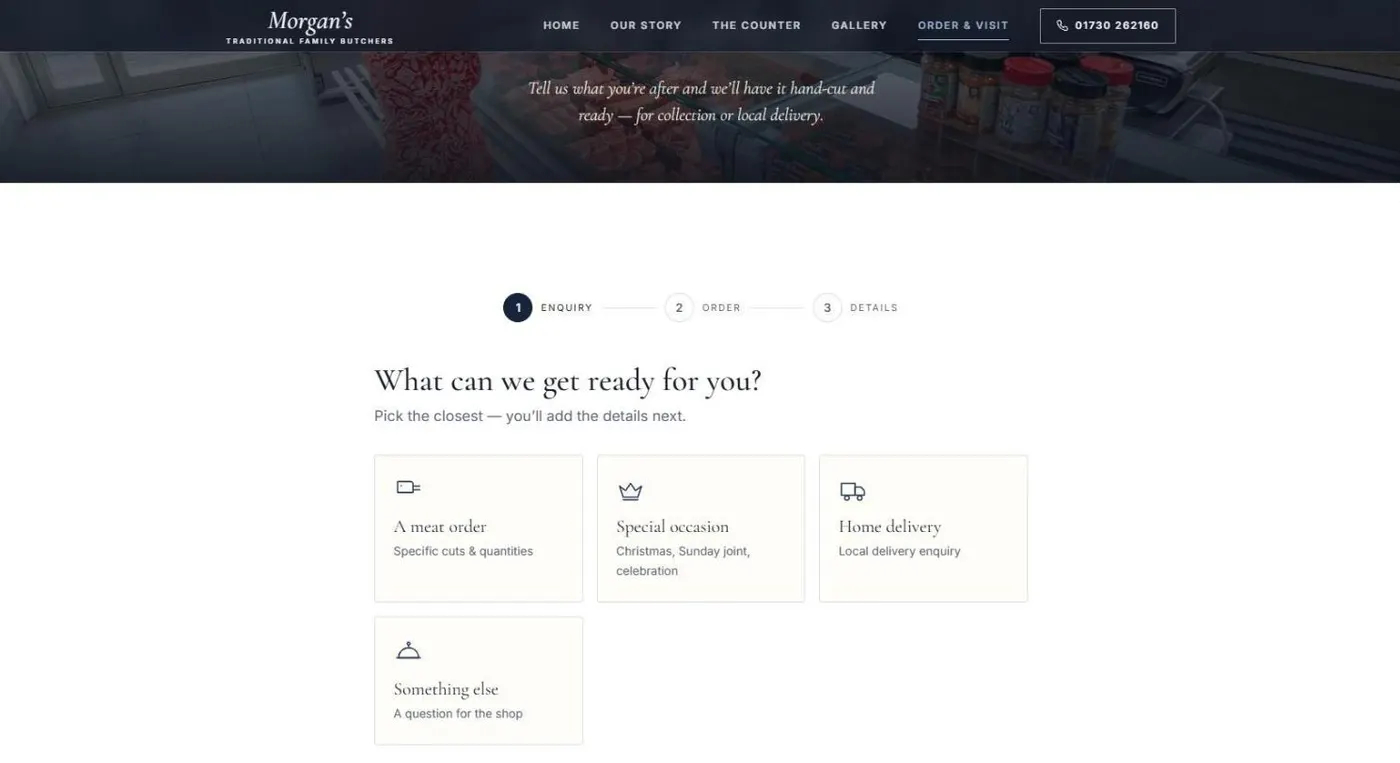
The form starts with one question: what can we get ready for you? A meat order, a special occasion, a home delivery or something else. Each choice asks only what that order needs.
Problem 2: deliveries only go out on certain days
Morgan's delivered on Wednesdays and Thursdays, around Bordon, Hindhead, Headley and the surrounding villages, with a minimum order. A plain date box would let people pick a Sunday.
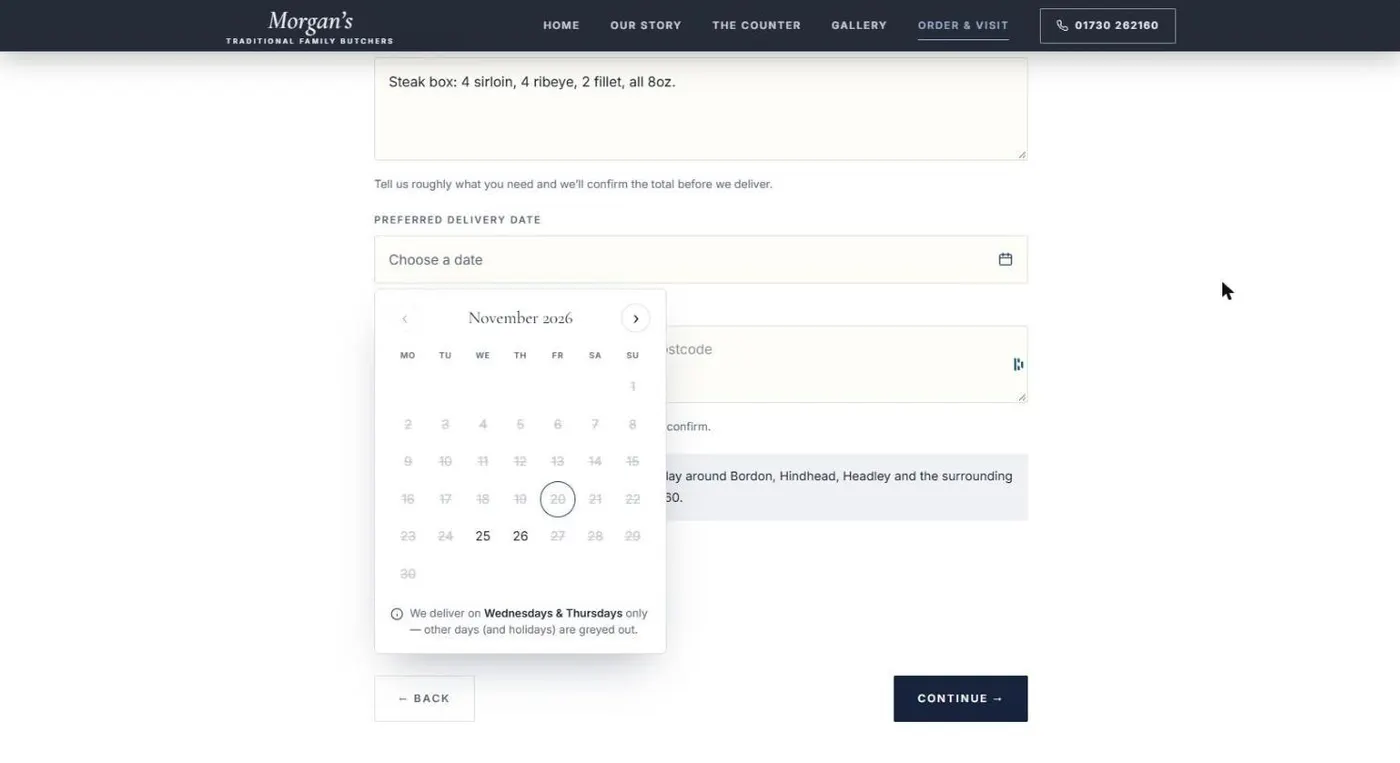
Choose home delivery and the calendar offers delivery days only. Closed days and bank holidays are greyed out, and the delivery area and minimum order sit right under it.
The shop sets the days, not me
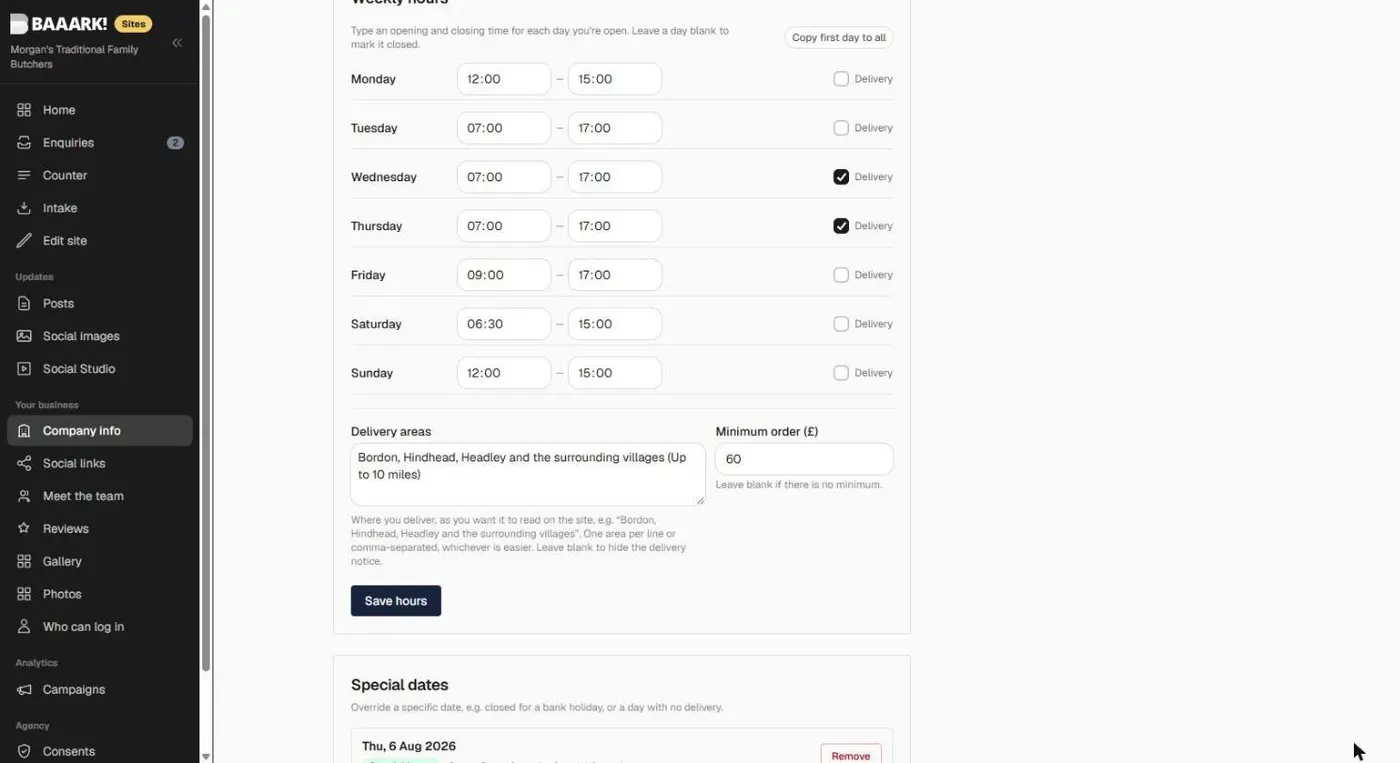
They tick their delivery days, type their delivery area and set the minimum in the admin, and the form, the calendar and the notice all follow.
Problem 3: telling orders apart
Orders taken without a number get muddled. Two people called Sarah, two joints of beef, the same Saturday.
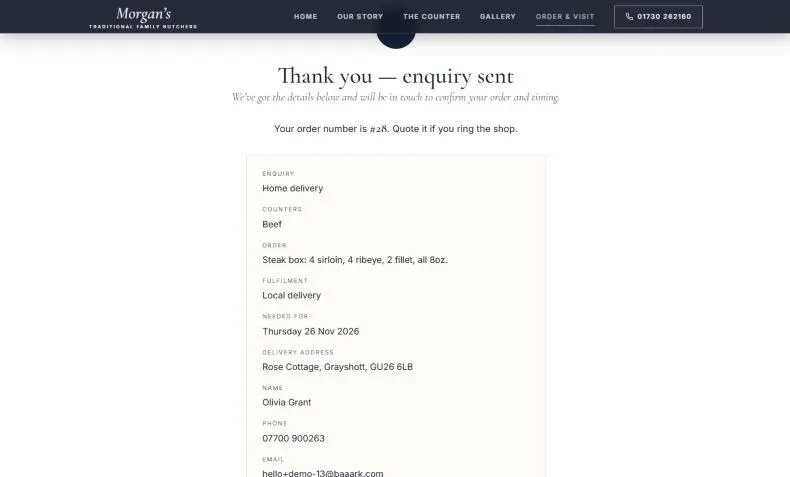
Every order now gets the next number the moment it's sent. The customer sees it on the thank-you screen and gets it in their confirmation email. If they ring, they quote it, and the shop finds the order in seconds.
Problem 4: orders arrive in two places
Plenty of customers will always pick up the phone. If phone orders live on paper and website orders live in an inbox, something gets missed.
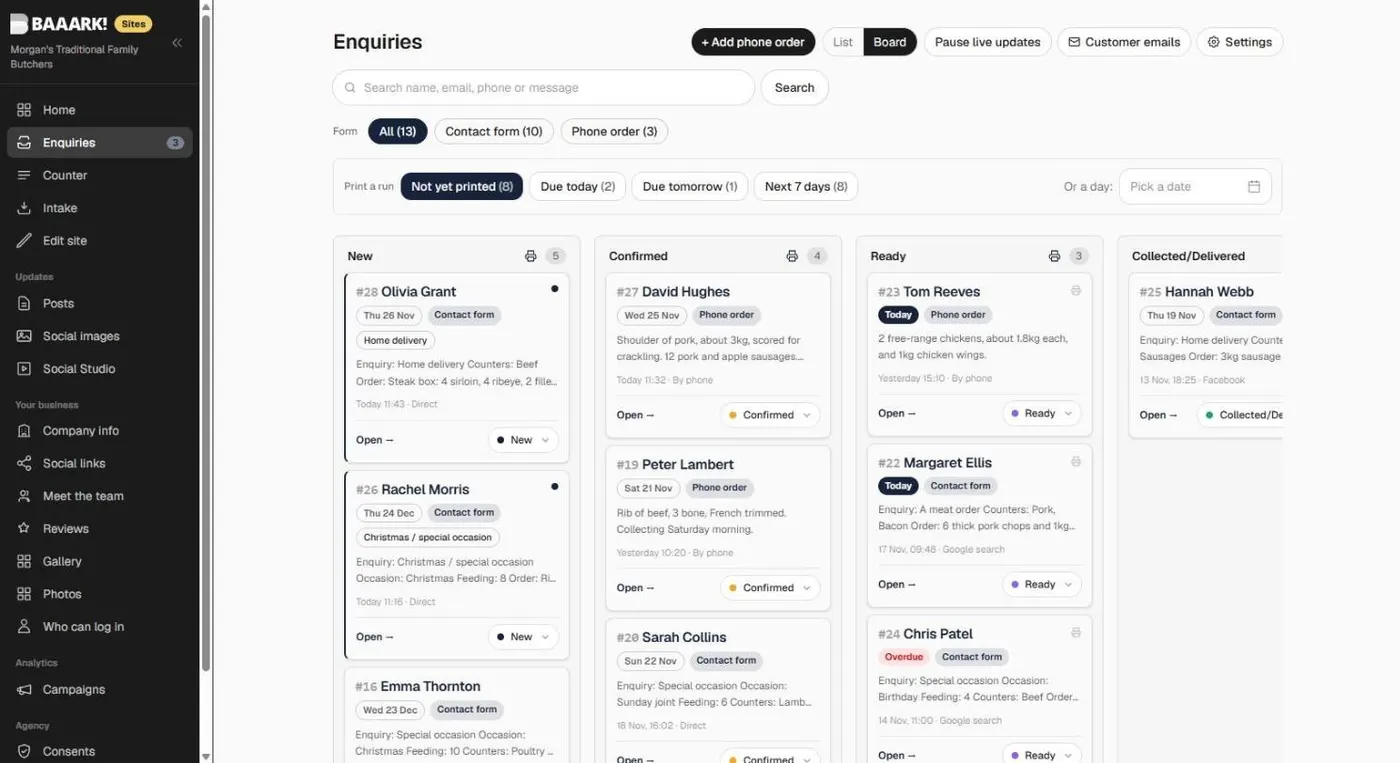
So both go on one board, in four columns: New, Confirmed, Ready, and Collected/Delivered. Each card shows the order number, the day it's wanted, collection or delivery, and where the order came from. Late orders turn red. Collected ones never do.
Phone orders in a few fields
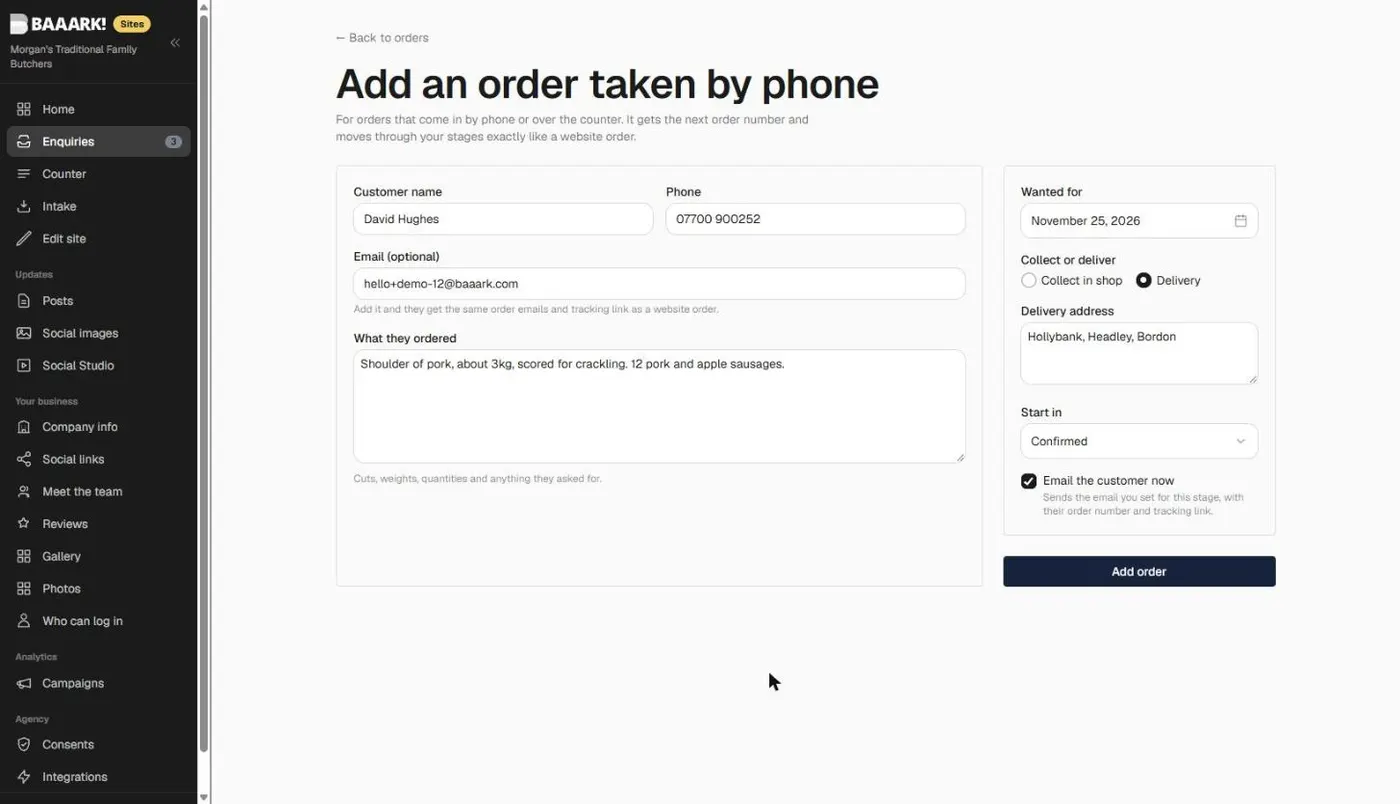
A phone order takes a few fields to add: name, number, what they want, the day, and collect or deliver. It gets the next order number and goes straight into Confirmed, because it was agreed on the call.
Problem 5: knowing where your orders come from
Every website order shows how the customer found the shop: a Google search, Facebook, a returning visit. It also shows which pages they read before ordering and how long they spent. Over a few months, that tells the shop which posts, pages and searches actually bring orders in.
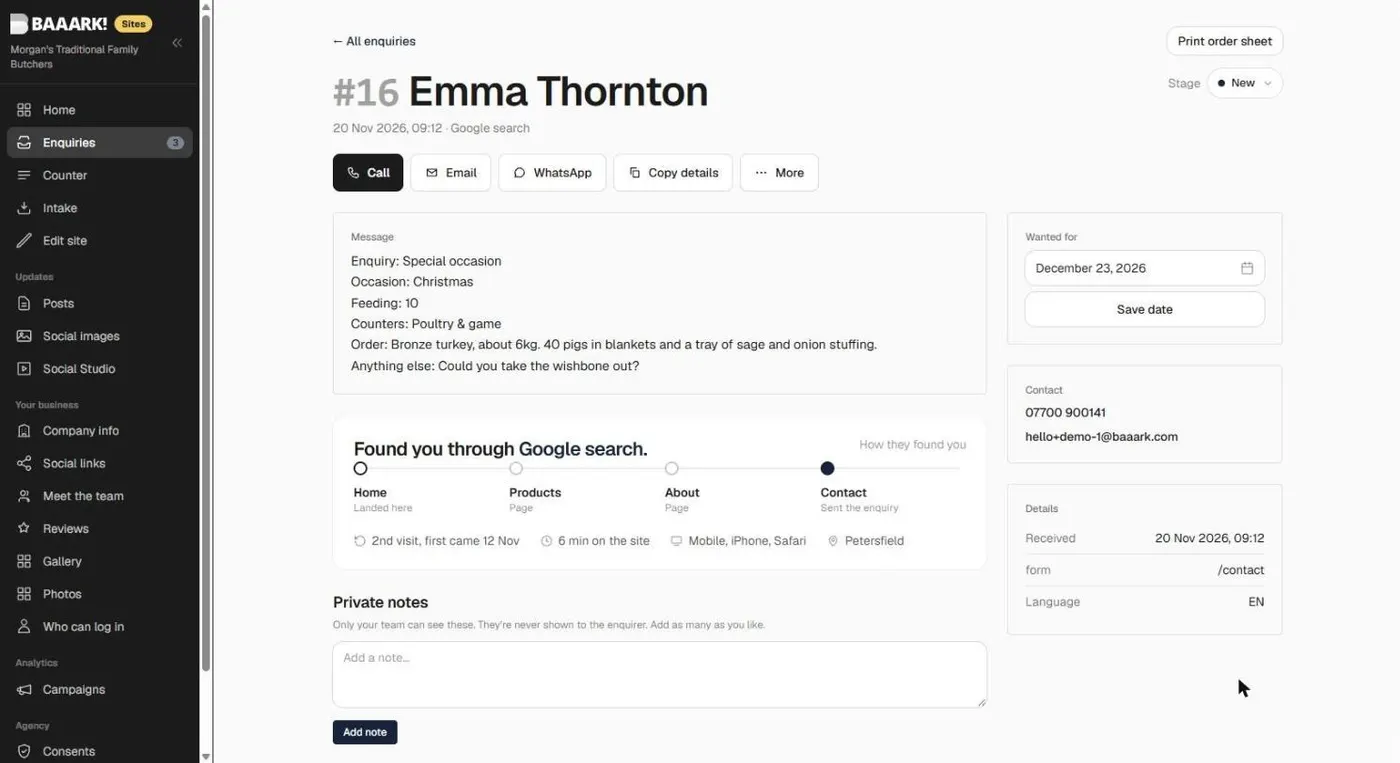
Phone orders say they were taken by phone, so nothing looks missing.
Problem 6: the busy hours
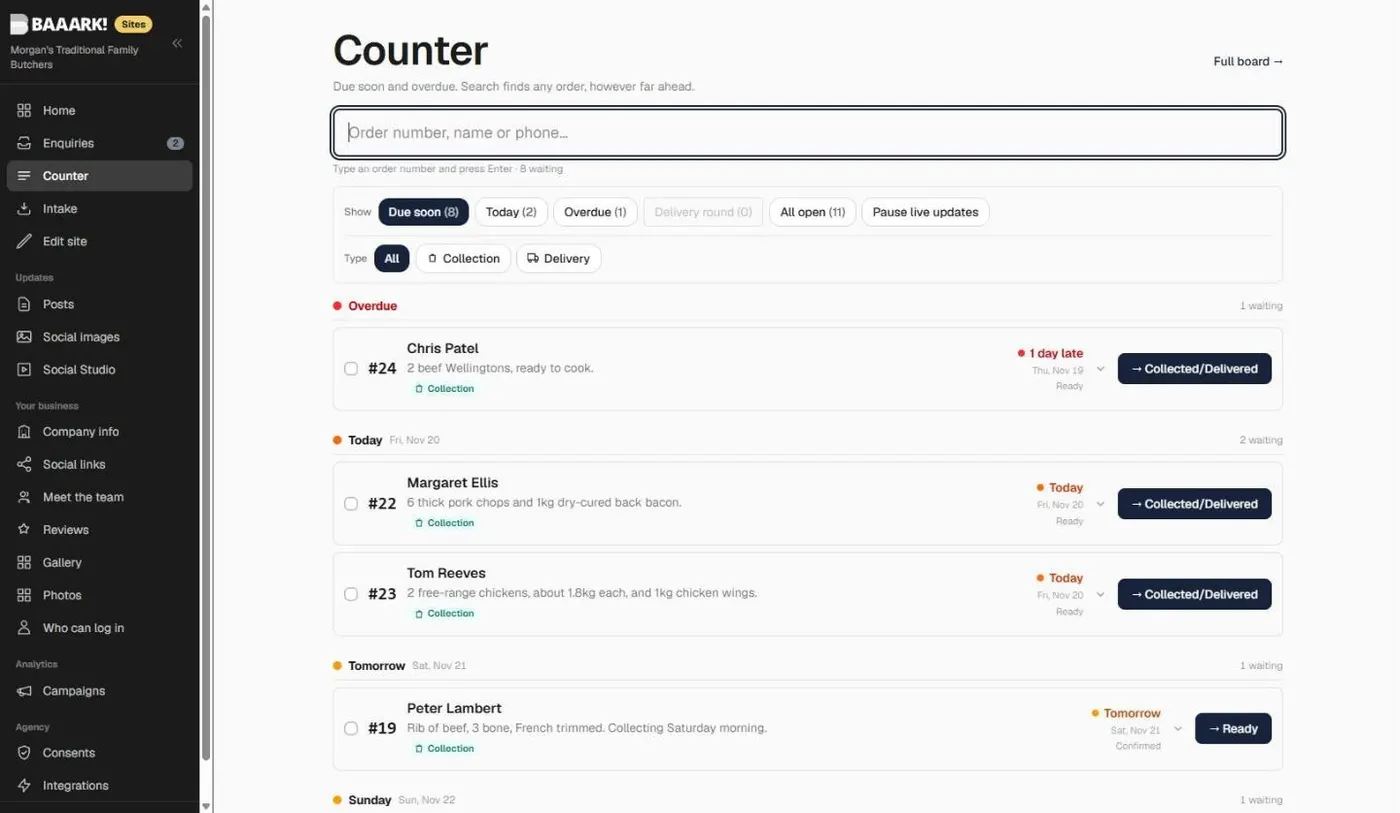
Saturday morning is no time to scroll a board. The counter screen groups what's due into Overdue, Today and Tomorrow. Type an order number or a name and it comes up straight away, with one button to move it on.
A sheet of paper for the block
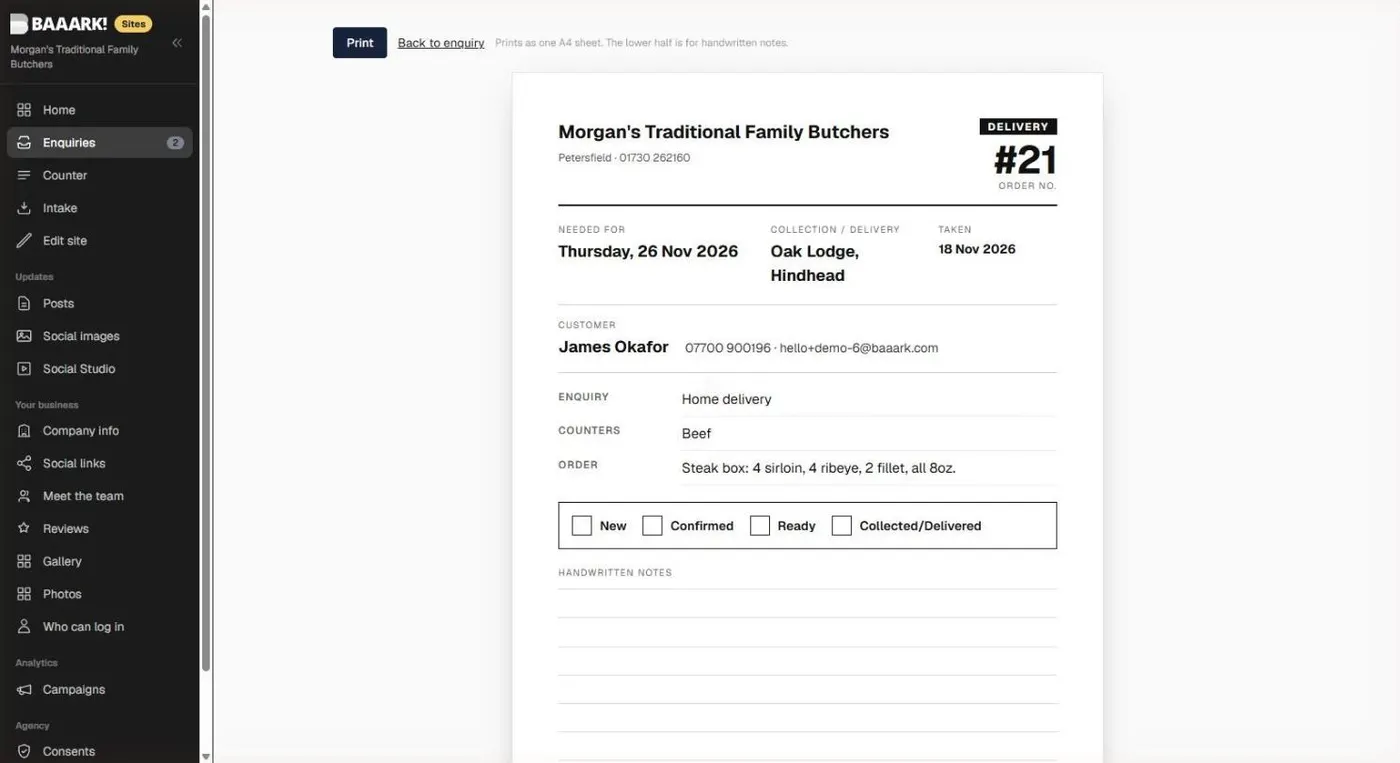
A butcher's work happens at the block, not at a screen, so every order prints as one A4 sheet. You can print a single order or the whole of Thursday's deliveries. The big number matches the order on screen, the tick boxes are the four stages, and the bottom half is for handwritten notes.
Problem 7: customers ringing to check
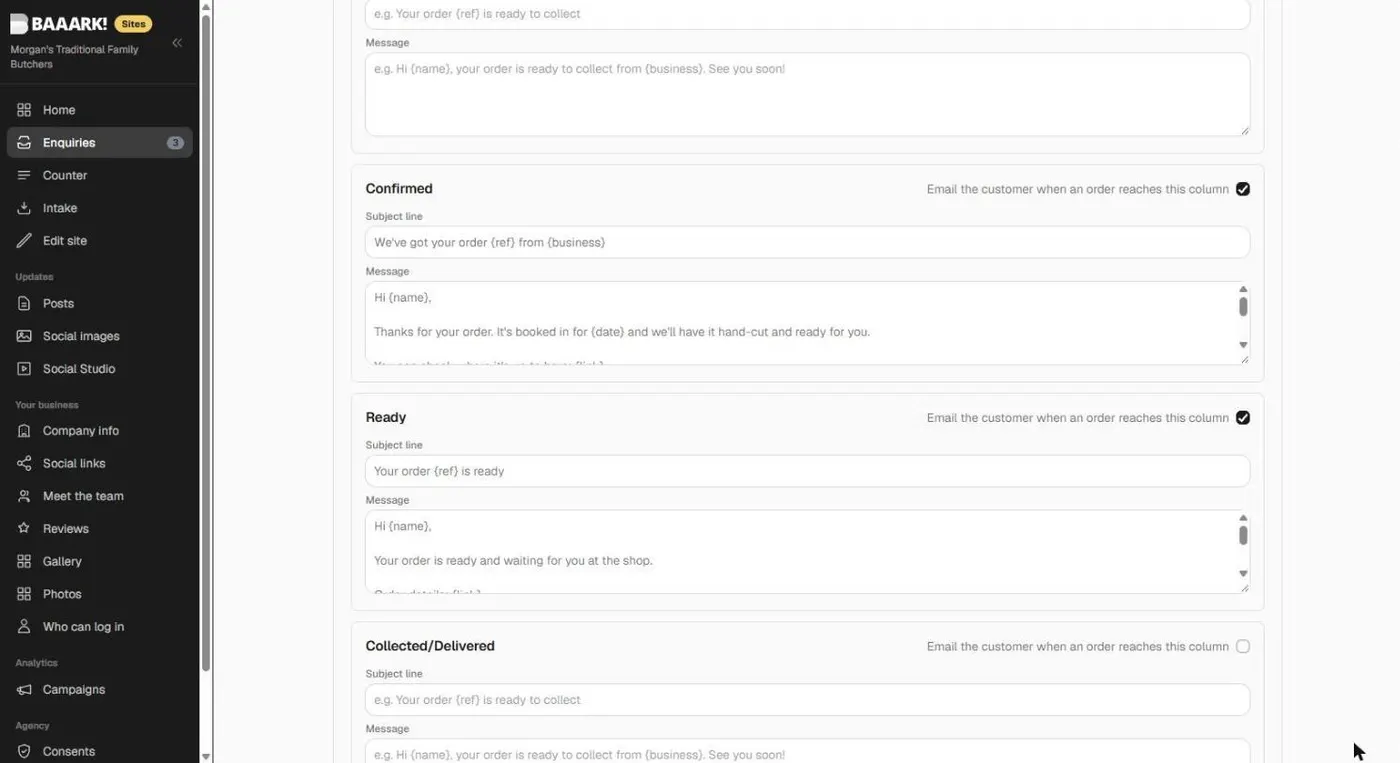
The shop switches on an email for any column of the board and writes it once. When an order moves to Confirmed, the customer gets a note with the day it's booked in for. When it moves to Ready, they get another with the shop's opening hours for that day.
A page that answers it for them
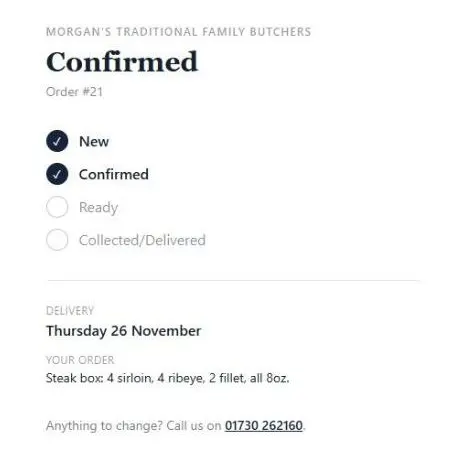
Both emails link to a page for that order, showing where it's up to and what was ordered. No login, and no need to ring.
Bringing it to other butchers
The system is too useful to sit unused. So I'm carrying on with it: tightening the screens, adding what other shops need, and offering it to independent butchers who want to take orders online without turning their shop into a website checkout.
The board, phone orders, order numbers, sheets, emails and tracking come ready. The part I shape for each shop is the order form: your counters, your delivery days and villages, your minimum order, and how you take Christmas orders.
It isn't only for butchers, either. A bakery taking cake orders, a florist doing weddings or a farm shop with Christmas boxes has the same problems: orders that don't fit a cart, phone orders on paper, and customers ringing to check.
If you run a butcher's or a shop like it, tell me how your orders work and I'll tell you what it would take. You can also see the Morgan's case study.
Questions people ask
Can a butcher sell online without a shopping cart?
Yes. Most butchers price by weight, so the total isn't known until the meat is cut. An order form takes the order and the day, the shop confirms it, and the customer pays at collection or on delivery, the same as an order taken over the phone.
Can phone orders and website orders go in the same system?
They can, and they should. In the system I built for Morgan's, staff add a phone order in a few fields and it gets the next order number, the same board, the same printed sheet and the same customer emails as a website order.
How do customers know when their order is ready?
The shop switches on an email for any stage of the board. When an order moves to Ready, the customer gets an email with their order number, the shop's hours for that day and a link to a page showing where their order is up to.
Can delivery be limited to certain days?
Yes. The shop ticks its delivery days in the admin. Choose home delivery on the form and the calendar only offers those days, with closed days and bank holidays greyed out.
Can other butchers use this order system?
Yes. I built it for Morgan's, and I'm now improving it and offering it to other independent butchers. The order form is shaped around each shop: its counters, its delivery days and area, and how it takes Christmas orders.
How much does a custom order system like this cost?
It depends on what the order form needs to ask and how the shop works. The board, phone orders, order numbers, emails and tracking come with the platform, so most of the work is shaping the form around the business. Tell me how you take orders now and I'll tell you what it would involve.

Born in Petersfield in 1986, now based in Poland. Twenty-five years running real businesses, and now I build websites, local SEO and socials for Hampshire small businesses. Every price I quote is on one page.
Want a straight answer for your business?
Tell me what you do and where. I'll come back within one working day with a fixed price, not a range.